Add WMTS connection in QGIS
Prerequisites
MapColonies token
In order to create a connection to our WMTS service you will need a token, contact us to receive one.
QGIS application
Install the QGIS application (version >3.26).
Create a new connection in QGIS
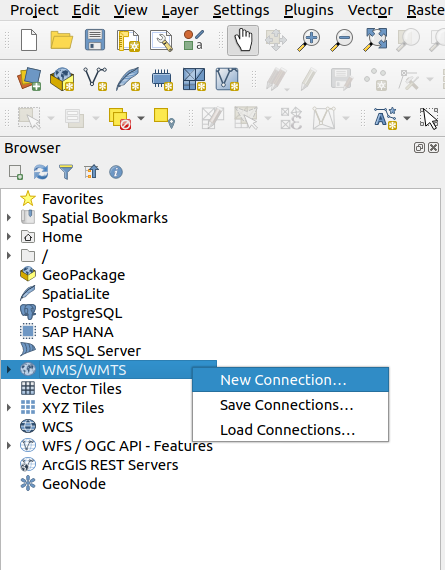
Open your QGIS application. In the browser windows (on the left), right click on WMS/WMTS and select New Connection....
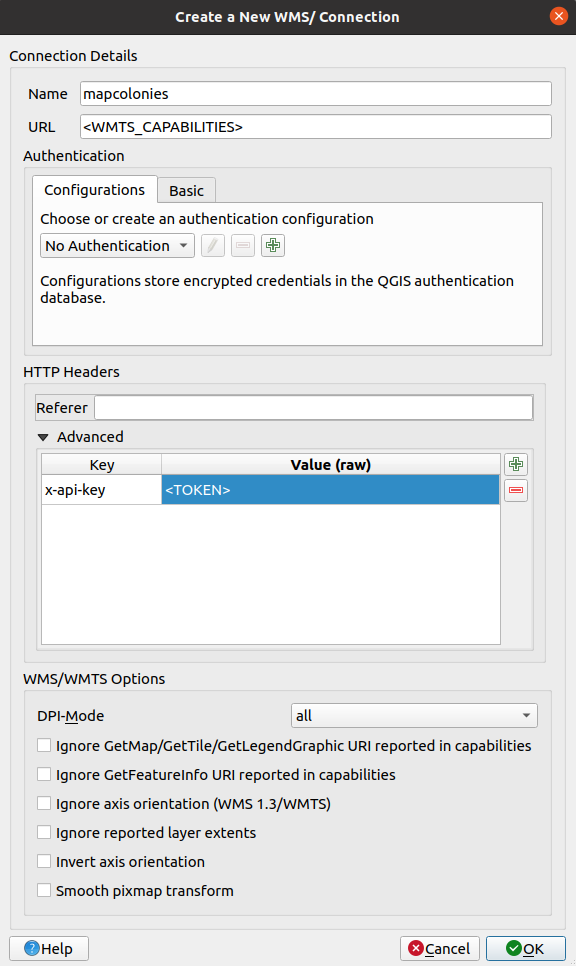
A connection creation form will open, fill the following:
Name- connection nameURL-WMTS CpabilitiesURL provided by us
Now click on Advanced under HTTP Headers and add a new header with the Key "x-api-key" and the value will be the token provided by us.
At the end of the process the form should look similar to this:
Click OK to create the connection. Now we can see it under WMS/WMTS:

Drag any layer to the Layers panel in order to view it.
And that's it, you are ready to start working with with our service and your data!